From Avi
Credit — the person, place or memory this came from
Food Stories · story · 20 min
How to Make a Family Recipe Book With Photos
Learn how to make a family recipe book with photos, handwritten cards, and personal stories. Get tips for scanning, layouts, and printing.
by Mor B.
How to Make a Family Recipe Book With Photos
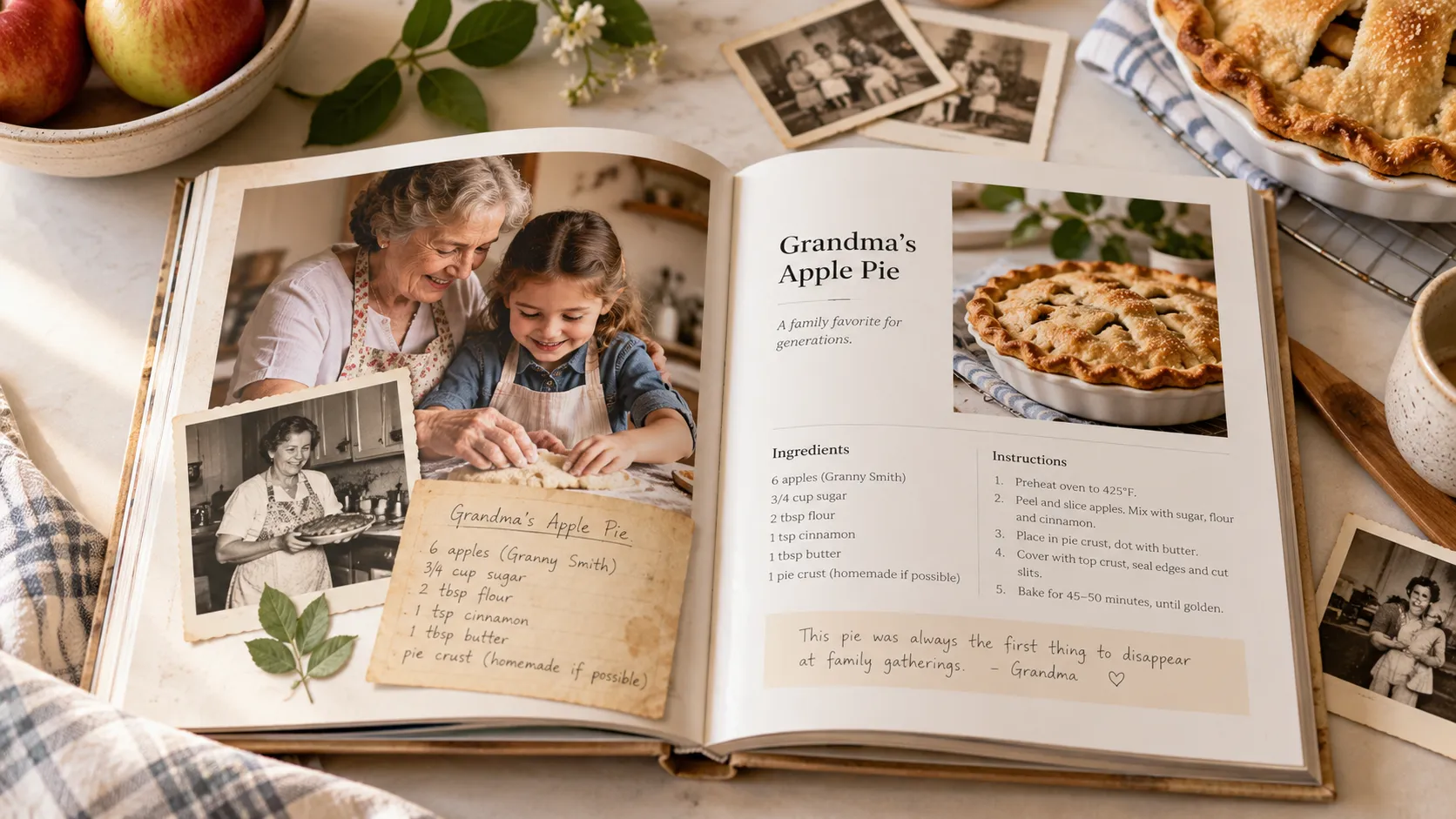
A family recipe book with photos brings together your favorite recipes, old family pictures, handwritten recipe cards, and the stories behind the food. To make one, gather the recipes and photographs you want to preserve, scan any old originals, organize the images by recipe, choose a readable page layout, and print everything as a personalized cookbook.
The recipes tell you how to make the food. The photos remind you who made it.
Think of your grandmother's apple cake. You might have the ingredients written on a stained index card, but what about the picture of her standing in the kitchen, flour on her hands, with that same cake cooling on the counter?
Put those things together, and you have something more meaningful than a collection of cooking instructions.
You have a little piece of family history.
A personalized family recipe book can bring those memories together in one place, whether you're making a gift for your parents, collecting recipes for a family reunion, or preserving traditions for the next generation.
The good news is that you don't need professional photography or design experience. Your phone, a collection of family photos, and a few simple layout decisions are enough to get started.
This guide focuses on making the visual side of your cookbook special: choosing meaningful photographs, preserving old recipe cards, taking new food pictures, arranging everything on the page, and preparing your book for printing.
If you're starting your entire cookbook project from scratch, our complete guide to how to make a custom cookbook covers collecting recipes, organizing chapters, budgeting, and choosing a printing method.
What Makes a Great Family Recipe Photo Book?
A great family recipe photo book does two things well: it helps people cook the recipes, and it tells the stories behind them.
That means your photographs should do more than decorate the pages.
A picture of a finished dish shows readers what they're making. A family photograph introduces the person who first made it. A handwritten recipe card preserves something even more personal: someone's handwriting, little corrections, and perhaps a few decades of cooking stains.
The best books usually combine all three.
How Many Recipes and Photos Should You Include?
There's no perfect number, but a collection of 20 to 60 recipes is a manageable starting point for many families.
You don't need a photo for every recipe. Some pages might feature a beautiful picture of the finished dish, while others might use an original handwritten card, a portrait, or no image at all.
If you're making a photo-rich book, consider collecting one meaningful visual for each recipe where possible, plus several family photographs for the cover, dedication, and chapter introductions.
For example, a book of 30 family recipes could include:
- 15 photographs of finished dishes
- 10 scanned handwritten recipe cards
- 10 photographs of family members cooking
- A few photographs from holidays and family gatherings
- One special image for the cover
Some recipes may have multiple images, and others may have none.
That's perfectly fine.
Choose photographs because they add meaning, not because you're trying to fill every available space.
Which Photos Should You Include in a Family Recipe Book?
Before you start scanning or photographing anything, look through your family albums, phone galleries, old recipe boxes, and saved messages.
You'll probably discover that you already have more useful material than you expected.
There are four types of photographs especially worth collecting.
1. Photos of the Finished Dishes
Food photographs help people recognize recipes and see what the finished meal should look like.
They can be especially useful when you're preserving a dish the next generation has never made.
Maybe your family has a traditional holiday bread with an unusual shape, or a layered cake that's supposed to look a certain way.
A clear photograph gives readers something to work toward.
Don't worry if your food pictures aren't perfectly styled. A real photograph of the dish on your family's dinner table can feel more authentic than a professional-looking studio image.
2. Pictures of the People Behind the Recipes
These are often the most meaningful photographs in the entire book.
Look for pictures of people actually cooking, not just formal portraits.
Grandpa standing beside the grill. Mom rolling out pie dough. Your sister making cookies with her children. Three generations working together in the kitchen.
Even an old snapshot from a birthday party or holiday dinner can help tell the story of a particular dish.
When possible, pair a recipe with a photograph of the person who made it famous in your family.
A small caption can make the connection clear:
"Grandma Rose making her famous Sunday meatballs, 1987."
That one sentence gives future generations a face, a name, and a memory to connect with the recipe.
3. Handwritten Recipe Cards and Old Cooking Notes
Sometimes the most beautiful image in a family cookbook isn't a photograph at all.
It's a handwritten recipe.
Maybe your grandmother wrote her pie recipe in blue ink on a card that's now yellow around the edges.
Perhaps your father scribbled his barbecue sauce ingredients on the back of an envelope.
You could even have an old cookbook with notes in the margins explaining how someone changed a recipe over the years.
These originals are worth preserving.
Scan them and consider placing the images beside clean, typed versions of the recipes.
That way, readers can enjoy the handwriting without having to decipher every faded word while cooking.
And don't feel obligated to remove every stain, crease, or smudge. Those imperfections are part of the card's history.
4. Photos of Family Traditions and Everyday Moments
Not every photograph needs to show a person or a finished dish.
Some images tell a story through small details.
Think about:
- The kitchen where everyone gathered for Sunday dinner
- A holiday table set for the whole extended family
- An old cast-iron skillet passed down through generations
- The garden where your grandparents grew tomatoes
- A family picnic or summer barbecue
- The house where a favorite recipe originated
These pictures help readers imagine the world around the recipes.
A photo of your grandmother's old kitchen might make a lovely introduction to a chapter of her favorite dishes.
A Thanksgiving family portrait could open your holiday recipes section.
The goal is to preserve the feeling of cooking together, not simply the appearance of the food.
How to Organize Family Photos Before Making Your Cookbook
Once you start collecting photographs from multiple relatives, things can get messy quickly.
One cousin sends twenty pictures through a group chat. Your aunt emails scans from an old album. Someone else discovers a folder of recipes and photographs on a forgotten computer.
A little organization now will save you time later.
Create a Simple Photo Folder System
Start with one main folder for the cookbook.
Inside it, create a few subfolders:
- Finished Dishes
- Family Members
- Handwritten Recipe Cards
- Holidays and Gatherings
- Cover and Chapter Photos
If your book is organized around family members, you can create a folder for each person's recipes and photographs instead.
Use whatever system makes the most sense for your family.
Rename Important Photographs
Files named IMG_4827.jpg won't tell you much five years from now.
Give important images descriptive names when you can.
For example:
grandma-rose-apple-pie-1987.jpg
johnson-family-thanksgiving-1995.jpg
handwritten-chocolate-cake-recipe.jpg
You don't have to rename every photograph, but do it for the ones you know you'll use.
Record the Stories While You Still Can
A photograph without context can become a mystery.
When relatives contribute pictures, ask three simple questions:
Who's in the picture? When was it taken? What's happening?
If they don't know the exact date, an approximate year or decade is fine.
Write down the answers now rather than hoping someone will remember later.
Those details can become captions in your cookbook, and they'll be valuable long after the book is finished.
How to Scan Old Family Photos and Handwritten Recipe Cards
Old photographs can look wonderful in a printed cookbook, but they need to be digitized carefully.
An image that looks sharp on your phone might become blurry when enlarged across a printed page.
The key is to capture as much detail as possible from the original.
What Resolution Should You Use When Scanning Photos?
For many printed photographs and recipe cards, scanning at 300 dpi at the intended reproduction size is a good starting point.
For smaller originals that you plan to enlarge, consider scanning at 600 dpi.
For example, if you want to turn a small family photograph into a large image in your cookbook, a higher-resolution scan may give you more flexibility.
Keep in mind that scanning resolution and final image size work together. Simply changing an image's DPI setting doesn't create missing detail.
Save a high-quality original file before making edits or resizing the image.
Can You Scan Recipe Cards With Your Phone?
Yes. A modern smartphone can do a good job, especially when you use a scanning app.
A flatbed scanner is usually more consistent for old printed photographs, but it's not essential for every project.
If you're scanning with your phone:
- Place the photograph or recipe card on a flat surface.
- Use bright, indirect daylight to avoid harsh shadows.
- Hold the phone directly above the original.
- Keep the camera parallel to the paper.
- Make sure the entire card is in focus.
- Check for glare before saving the image.
- Scan both sides if there are notes on the back.
A plain background makes it easier to crop the edges cleanly.
If you're scanning a faded recipe card, try adjusting the contrast slightly so the writing becomes more readable.
Should You Restore Old Family Photographs?
Light restoration can help.
You might straighten a crooked scan, crop distracting edges, gently improve contrast, or correct a faded color cast.
But avoid making an old family photograph look unnaturally perfect.
Some scratches and creases are part of its character.
For especially fragile or historically valuable photographs, consider asking a professional photo conservator for advice before cleaning or handling them.
And always preserve an untouched digital copy of the original scan.
It's also worth keeping backups of the entire photo collection. After all, the digital archive may become just as meaningful to your family as the printed cookbook.
How to Take Beautiful Food Photos With Your Phone
What if you have plenty of recipes but very few pictures of the food?
You can create those photographs yourself.
And you don't need an expensive camera.
Today's smartphones are capable of taking food photos that look excellent in printed cookbooks, especially when the lighting and composition are right.
Use Natural Light Whenever Possible
Good lighting makes the biggest difference.
Place the finished dish near a window, where the light is soft and even.
Turn off harsh overhead kitchen lights if they create yellow tones or distracting shadows.
Overcast days can be especially useful because the natural light is diffused.
Avoid using your phone's built-in flash unless absolutely necessary. It can create glare on sauces, make colors look unnatural, and flatten the appearance of the food.
Choose the Best Angle for Each Dish
Different foods look better from different angles.
For flatter dishes like pizza, cookies, and salads, try photographing directly from above.
For taller dishes like layer cakes, burgers, or stacks of pancakes, use a lower angle that shows their height.
For soups, casseroles, and plated dinners, experiment with both.
Take several photographs before you put your phone away.
Keep the Background Simple
Your food should be the focus.
A wooden table, neutral tablecloth, simple plate, or linen napkin is usually enough.
You don't need elaborate props.
In fact, using your family's familiar dishes, serving bowls, or kitchen table can make the photo more meaningful.
That old casserole dish everyone recognizes might deserve a place in the picture.
Include People and Small Moments
A hand cutting into a pie.
Someone serving soup into bowls.
A child helping decorate cookies.
These little moments make the photographs feel alive.
If you're recreating a family recipe specifically for the cookbook, consider turning the cooking session into a family gathering.
You'll get photographs of the finished dish, but you may also capture new memories worth including in the book.
What if You Don't Have a Photo for Every Recipe?
Almost every family recipe collection has a few dishes with no photographs.
Maybe nobody thought to photograph the soup your grandfather used to make.
Perhaps the recipe hasn't been cooked in years, or the original family cook is no longer around.
That doesn't mean the recipe should be left out.
Here are several ways to handle missing pictures.
Use a Photograph of the Person Who Made the Dish
Sometimes a portrait is more meaningful than a food photograph.
If you don't have a picture of Grandma's famous chocolate cake, use a photograph of Grandma.
The recipe is part of her story, after all.
Include the Original Handwritten Recipe
A scan of the recipe card can serve as the main visual.
This works particularly well for older family recipes because the handwriting connects the reader directly to the person who wrote it.
Cook the Recipe and Photograph the Result
This is a wonderful opportunity to bring an old family dish back to the table.
Gather the ingredients, invite a relative who remembers the recipe, and cook it together.
You can photograph the process as well as the finished dish.
Use an AI-Generated Recipe Image
For recipes without available photographs, an AI-generated food illustration is another option.
Vinst includes an AI photo generator that can create a food image based on a recipe.
This can help give recipes a consistent visual appearance without requiring you to cook and photograph every dish.
For a family heritage cookbook, though, it's important to distinguish authentic photographs from generated illustrations.
A generated picture can illustrate how a dish might look, but it isn't a historical photograph of your family's version.
Consider labeling AI-generated images where that distinction matters.
Leave Some Pages Without Photos
This is also a perfectly good choice.
A well-designed recipe page with clear instructions and a short family memory can be beautiful without any photograph.
Don't add an image simply because you think every page needs one.
Family Recipe Book Photo Layout Ideas
Once you've collected your photos, it's time to think about how they'll appear beside the recipes.
This is where a recipe collection begins to feel like a real book.
The best layout depends on the photographs you have and the stories you want to tell.
Here are four approaches worth considering.
1. Full-Page Photo With a Recipe on the Opposite Page
This layout works beautifully for signature family dishes.
Imagine a full-page photograph of Grandma's apple pie on the left, with the complete recipe and a short memory on the right.
The photograph gets room to shine, while the instructions remain easy to read.
It's especially effective for recipes with a strong family connection.
2. Food Photo Above the Recipe
For everyday dishes, a smaller photograph at the top of the recipe page often works well.
Below it, include the recipe title, ingredient list, cooking steps, and a brief note.
This layout is practical and makes it easy to feature more recipes without creating an unnecessarily large book.
3. Handwritten Recipe Card Beside a Typed Version
This is one of the most meaningful layouts for a heritage cookbook.
Place a photograph of the original recipe card beside a clean, readable transcription.
Readers get the best of both worlds: the personality of the original and the clarity of modern instructions.
For example, an old card might say:
"Bake in a moderate oven until golden."
The typed version can preserve that wording as a family note while providing an oven temperature and baking time verified through testing.
4. Family Story or Photo Collage Page
Not every page needs a recipe.
Consider adding a family photograph at the beginning of each chapter, accompanied by a short story.
You could include a collage of holiday celebrations, a portrait of the family cook, or several photographs showing a dish being prepared through the years.
These pages give the book breathing room and make it feel more like a family album.
How Large Should Cookbook Photos Be for Printing?
Image quality depends on how large the photograph will appear in the finished book.
As a planning guide, these approximate dimensions provide 300 pixels per printed inch:
Printed image widthSuggested image width3 inches900 pixels4 inches1,200 pixels6 inches1,800 pixels8 inches2,400 pixels
A small photograph beside a recipe needs fewer pixels than an image filling most of the page.
Vinst recommends high-resolution images at least 1,200 pixels wide for good results, although larger files are preferable for large print placements.
Whenever possible, use the original photograph rather than a compressed image downloaded from a messaging app.
Don't Forget Photo Captions
A short caption can turn a photograph into a family story.
Instead of writing:
"Thanksgiving dinner."
Try:
"Thanksgiving at Grandma's house, 1992. Uncle Robert made the stuffing, and everyone argued about whether it needed more sage."
You don't need to write a paragraph for every picture.
A name, date, place, and small memory are often enough.
How to Create a Family Recipe Photo Book With Vinst
Once your recipes and photographs are ready, you can bring them together using an online cookbook maker.
Vinst is designed to help you turn recipes, pictures, and personal stories into a professionally printed family cookbook without manually designing every page.
Here's how to use it for a photo-focused cookbook.
1. Import Your Family Recipes
Start your cookbook and add your recipes.
Vinst supports recipe imports from handwritten notes, photographs, screenshots, text documents, and recipe website links.
Its AI-assisted import tools convert recipe information into a structured digital format, reducing the need to type everything manually.
Review imported recipes carefully, particularly older handwritten instructions and ingredient measurements.
2. Add Your Family Photographs
Upload food pictures, family photographs, or other meaningful images from your phone or computer.
You can use authentic family photographs wherever you have them and choose generated food images when a recipe needs an illustration.
Keep your original family photographs safely backed up outside the cookbook project as well.
3. Arrange Your Recipes and Personalize the Book
Organize recipes into sections that reflect your family's traditions.
You might group them by family member, holiday, course, or generation.
Choose a meaningful cover image and add a dedication.
Vinst handles the cookbook formatting, so you can focus on selecting the recipes and photographs that matter most.
4. Invite Family Members to Contribute
If you're building a cookbook with relatives, Vinst's mobile app supports shared recipe collections where family members can contribute recipes, notes, and photos.
At present, collaboration is available through the mobile app rather than the web cookbook editor.
This can be useful when you're collecting memories from several households.
5. Preview Your Family Recipe Book
Before ordering, review the complete digital preview.
Check that the photos look clear, the recipe text is readable, and everything appears in the correct order.
Make sure names, dates, captions, and dedications are correct.
Pay particular attention to older or lower-resolution photographs that might not look as sharp when printed.
6. Order Your Printed Cookbook
Vinst offers full-color, 8.5 × 11-inch hardcover cookbooks printed on coated paper.
You can create and preview the book for free, then pay when you're ready to order printed copies.
A hardcover currently starts at $40 for up to 20 recipes, with additional recipes priced at $1 each. Longer recipes, shipping, and other applicable charges may affect the final total.
Multiple-copy bundles are also available if you want to give books to different family members.
For US orders, printing can take up to five business days, followed by shipping. Check delivery options at checkout if you're ordering for a specific event.
Your digital recipes remain available to share through Vinst as well, allowing family members to access the collection even when they're not near the printed book.
Ready to bring your family recipes and photos together?
Start your family cookbook at vinst.me, add your favorite recipes and photographs, and preview the finished book before ordering a printed copy.
A Simple Family Cookbook Photo Checklist
Before you finish your book, use this checklist to make sure you've collected the little details that future generations will appreciate.
Photographs to gather
- Favorite family dishes
- People who contributed recipes
- Older relatives cooking
- Handwritten recipe cards
- Holiday dinners and celebrations
- Family kitchens and meaningful places
- A special cover photograph
Details to record
- Names of people in each photograph
- Approximate dates and locations
- Stories connected to the recipes
- Family nicknames and traditions
- Original recipes and cooking notes
Before printing
- Use the highest-resolution photographs available
- Check that scanned handwriting is readable
- Review captions and names
- Confirm that recipes match their photographs
- Proofread ingredient quantities
- Review the complete book preview
You don't need to check every box.
A few carefully chosen memories can make a book feel deeply personal.
Frequently Asked Questions About Family Recipe Books With Photos
How do I make a family recipe book with pictures?
Gather your family recipes, photographs, and handwritten cards. Scan older originals, organize the images by recipe or family member, and choose a layout that keeps cooking instructions readable. You can design the book manually or use an online cookbook maker to arrange the pages and order printed copies.
Can I include old handwritten recipe cards in a photo cookbook?
Yes. Handwritten recipe cards are often among the most meaningful images in a family cookbook. Scan them carefully, preserve the original handwriting, and consider placing a typed version alongside each card so the recipe is easier to follow.
What resolution should family photos be for a printed cookbook?
For sharp printing, aim for approximately 300 pixels per inch at the size the photo will appear on the page. A 4-inch-wide picture, for example, would ideally be around 1,200 pixels wide. Larger images need more pixels, although the exact requirements depend on the printing process.
How many pictures should I include in a family recipe book?
There's no fixed rule. One meaningful image per recipe is a useful goal, but some recipes may deserve multiple pictures while others work better without one. A mix of food photographs, family portraits, and handwritten recipe cards creates variety.
Can I make a family cookbook if I don't have photos of the food?
Absolutely. You can use a photograph of the cook, scan the original recipe card, or prepare and photograph the dish yourself. You can also use an AI-generated illustration, but avoid presenting generated images as authentic historical photographs.
Can relatives contribute photos to a shared family cookbook?
Yes. Vinst's mobile app allows invited family members to contribute recipes, notes, and photographs to a shared collection. This can make gathering material from relatives easier, especially when everyone lives in different places.
Can I make a family recipe book with photos for free?
You can collect and organize recipes using free digital tools. Vinst also lets you create, personalize, and preview a family cookbook for free. You pay only if you decide to order printed copies.
Can I share a digital version of my family cookbook?
Yes. Vinst allows you to share digital recipes online, making the collection accessible to family members even if they don't have a printed copy. Your recipes and photographs remain yours.
Turn Your Family Photos and Recipes Into Something Worth Keeping
Most families have photographs they'll never get around to organizing and recipes they always mean to write down.
Sometimes the two are connected in ways you don't realize until you start looking.
An old photograph reminds you of a favorite meal. A handwritten recipe brings back the sound of someone working in the kitchen. A holiday picture reminds you of the dessert that appeared on the table every year.
Putting those memories together gives them a place to live.
You don't need every recipe, every photograph, or a perfect family archive.
Start with the dishes people love. Find the pictures that tell their stories. Save the handwriting, the small details, and the memories that might otherwise be forgotten.
The result can be a family recipe book that people don't just read, but cook from, share, and pass down.
With Vinst, you can bring your favorite recipes and family photos together, personalize your cookbook, and preview the complete book for free before printing.
Create your family recipe photo book at vinst.me and give your family's favorite memories a place at the table.
Share
Every page can be shared; the link carries an identifier (§9)
Billboard — Start creating your cookbook
The post's primary call to action, named in its brief